
Learn to use AI tools with real confidence in your business, prompts, judgment, and a couple of automated workflows in six weeks. No coding required.

Self-paced · No coding needed
Taught by Alex Grapov


Have your own prompt playbook, written around your real work — marketing, sales, operations or managing a team.
Have built your own AI assistant that knows your products, your tone and your rules, and answers like someone from your company.
Know how to check AI output for accuracy and risk before it reaches a client, a customer or goes into anything you publish.
Have finished a real project — one working AI setup for a task you do every week — and hold your UONE certificate of completion.
Honestly — if you only need a few prompts now and then, you probably don't need this. Here is the real difference when you want to change how you work, not just try a tool once.
Generic prompts, not built around your work
Teaches the tool, rarely teaches when not to trust it
You watch. You don't build anything
Scattered across dozens of videos, in no clear order
Nothing to show at the end
A prompt playbook built around your real job — marketing, sales, operations or managing a team
A full section on checking AI output for accuracy and risk before it reaches a client
A task in every lesson, done on your own work — and a final project you actually finish
One clear path, from your first prompt to your own working AI assistant
A finished project, and a certificate tied to it


Eight modules, from how the models work to a finished project you can point to.
How tools like ChatGPT, Claude and Gemini produce answers, and where they break
Five mistakes almost everyone makes the first time
Choosing the right tool for the task, not the most talked-about one
A repeatable structure: role, task, constraints, format
Prompt templates for the jobs you repeat every week
Why the same prompt gives different answers, and how to control it
Emails, posts and proposals that still sound like you
Editing and shortening without losing the meaning
Adapting one message for different audiences
Summarising long documents you don't have time to read
Turning raw numbers into a short written summary
How to check every fact, figure and source before you use it
Product photos, banners and illustrations from a written description
What you can and cannot use commercially
A prompt library for the images a business actually needs
Giving an assistant your own documents and tone of voice
Testing it properly before anyone else uses it
Handing it to a colleague or your whole team
What should never be pasted into a public AI tool
How to check output before it reaches a client or your team
Where a person has to stay involved
Choosing a real task from your own work
Building it and writing down how it works, step by step
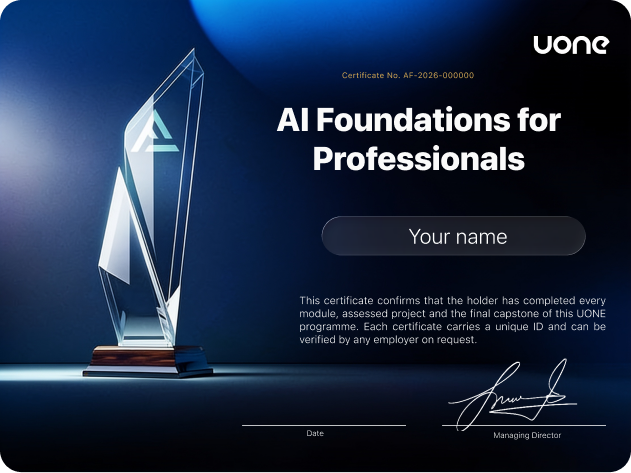
Your UONE certificate of completion

The tool list is refreshed as the field moves — this is what is current right now.

Conversational drafting, analysis and iteration

Long-document reading and careful reasoning

Research and Google-workspace tasks

Notes, docs and knowledge bases

No-code automation across apps

Visual multi-step workflow building

Sourced research with citations

Image generation for visual assets

Every lesson is open the moment you join. Study around your job, not instead of it. Stop for two weeks and nothing is lost.
Access for as long as UONE Academy runs the platform — minimum 36 months guaranteed. Content updates included for 12 months.
Watch in a queue, between calls, on the way home. Written notes with every lesson, yours to keep.
Completion requires the capstone project, not just watching videos — so it actually means something, whether you are adding it to LinkedIn or showing a prospect you take your business seriously.
Yes. The course assumes you know nothing about AI and starts from what these tools actually are. If you can write an email and use a browser, you have everything you need. No coding, no maths, no technical background.
ChatGPT, Claude, Gemini, Perplexity, Microsoft Copilot and image tools like Midjourney. The free versions of these are enough to complete the course. You do not need to pay for any subscription to finish it.
No. Nothing in the course requires writing code. Everything is done by typing instructions in plain language.
Yes. The assistant you build in the course works with your own documents, your products and your tone of voice. If your company has strict IT rules about which tools you may use, check with them first — we show you what data should never go into a public AI tool.
It's at your own pace. There's no schedule and no group to fall behind. Most lessons are short enough to watch between other things. Start on a Sunday, start in January, or stop for two weeks — nothing is lost.
Access for as long as UONE Academy runs the platform — minimum 36 months guaranteed. Content updates are included for 12 months.
Two things: a working AI setup you built for your own work, and a UONE Academy Certificate of Completion that records it. The project is the proof. The certificate is the paper that says so.
Yes. Lessons are short and work on a phone, a tablet or a computer. Every lesson also has written notes you can keep.
English, Spanish, Hungarian, Japanese, Hindi and Bengali. Choose your language when you start — the lessons, the notes and the tasks are all translated.
No. Everything runs in a normal browser on a normal laptop.

Three new courses are in production. You'll hear about each one before it's public.